VLSI Korea
LSF (Load Sharing Facility) Usage Guide: Job Scheduler Program Frequently Used in AI, Simulation, and Semiconductor Design
LSF (Load Sharing Facility) Usage Guide: Job Scheduler Program Frequently Used in AI, Simulation, and Semiconductor Design Let's explore LSF (IBM Spectrum...


🆓 무료 글 · 누구나 무료로 읽을 수 있는 글입니다
LSF (Load Sharing Facility) Usage Guide: Job Scheduler Program Frequently Used in AI, Simulation, and Semiconductor Design
Let's explore LSF (IBM Spectrum LSF), one of the server management programs in detail.
To summarize briefly:
- Companies and research institutes have numerous people using supercomputers.
- They will request many jobs from computers.
- This system manages various aspects of these jobs: what order they should be processed in, what time limits they shouldn't exceed, how much hardware resources should be allocated, and more.
The IBM User Guide below is the best documentation, and what I've written is... just a collection of 'the most frequently used things from a user's perspective.' If you have frequently used features, please let me know!

IBM Spectrum LSF IBM Documentation.
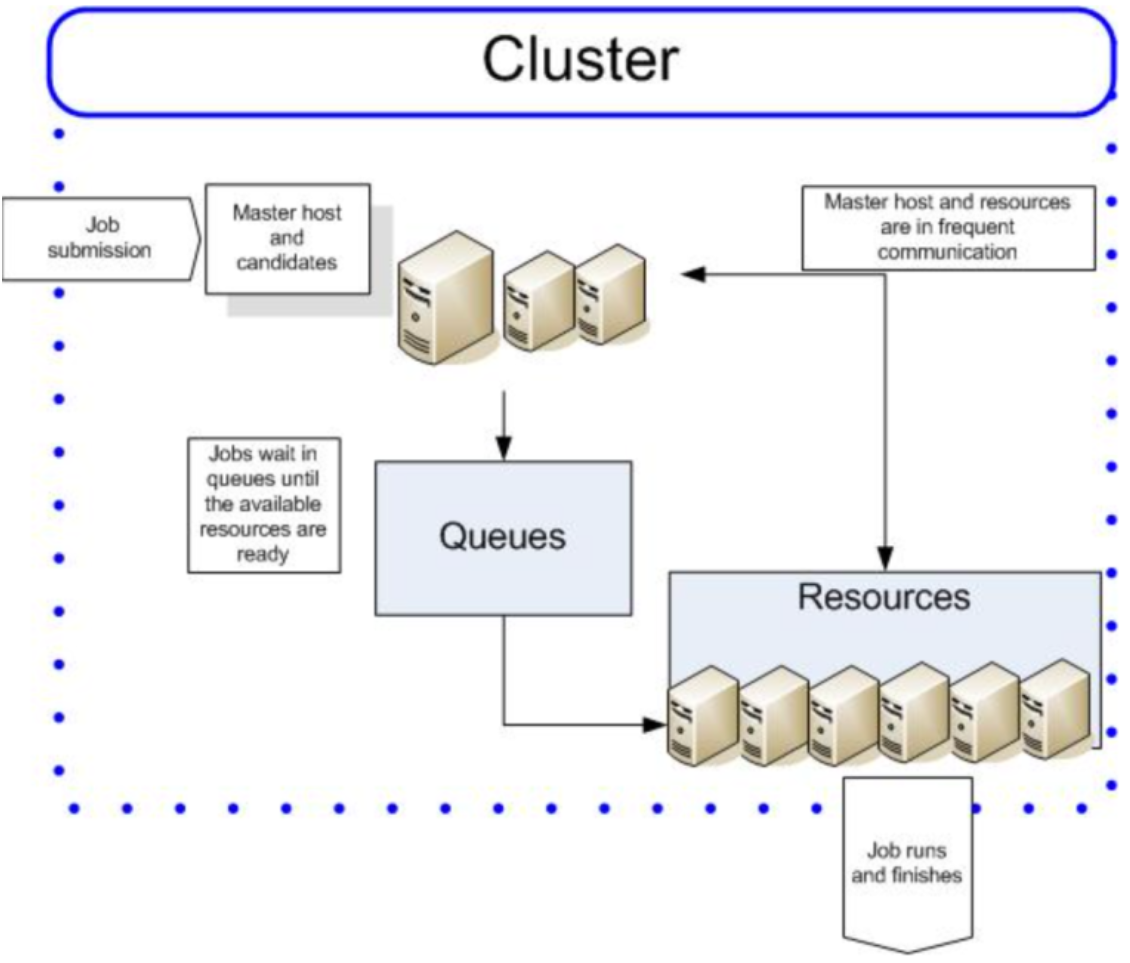
LSF (Load Sharing Facility) is a workload management platform for distributing and managing many jobs in HPC (High Performance Computing) environments, particularly used for executing batch jobs across multiple Unix and Windows systems on a network.
Note that LSF is IBM's paid license tool. Due to its relatively high price, it's mainly used by organizations of considerable size.
1. What is LSF?
LSF (Load Sharing Facility) is a Workload Managing Platform and Work Scheduler known as IBM Spectrum LSF. In HPC environments, it efficiently distributes jobs by utilizing multiple hosts on a network as a single system. LSF assigns jobs to the most suitable hosts and optimizes resource utilization by managing system load in a balanced manner.

Source: IBM
Key Features
- Workload Distribution: Efficiently uses resources by distributing jobs across multiple hosts.
- Batch Job Execution: Places batch jobs in queues for sequential execution.
- Resource Management: Selects hosts based on job resource requirements like CPU and memory.
- Interactive Job Support: Enables execution of interactive jobs on remote hosts.
- Transparency: Jobs running on remote hosts feel as if they're running on local hosts.
LSF is particularly useful in fields with heavy computational workloads. For example, artificial intelligence, CAD (Computer-Aided Design) tools, and mechanical simulation tasks.
2. Major Components of LSF
LSF consists of several components, each performing specific roles. Below are the major components:
| Component | Description |
|---|---|
| Load Information Manager (LIM) | Runs on each server host, monitors host load, and exchanges information with other LIMs. One LIM in the cluster acts as master, collecting load information from all hosts. |
| Remote Execution Server (RES) | Runs on each server host and is used to execute jobs on remote hosts. |
| Load Sharing LIBrary (LSLIB) | The basic interface through which applications interact with LSF. |
| LSF Batch | Places batch jobs in queues and schedules them according to dynamic load information. |
| LSF JobScheduler | Extends LSF Batch to support calendar-based or event-based jobs. |
| LSF MultiCluster | Enables load distribution across multiple clusters. |
Additionally, LSF provides the following tools:
- lstcsh: Load-sharing version of tcsh shell.
- lsmake: Load-sharing version of GNU make.
- pvmjob/mpijob: Support for parallel jobs (PVM and MPI).
Source: IBM
3. LSF Usage [Most Frequently Used Features]
To use LSF, you need access to a cluster environment with LSF installed. Here, we introduce basic commands and usage that beginners can easily follow.
3.1. Interactive Job Execution (lsrun)
Interactive jobs can be executed on remote hosts using the lsrun command. This executes jobs immediately, and keyboard signals (e.g., CTRL-C) work like local jobs.
Specifying a particular host:bash
lsrun -m hostD myjobExecutes myjob on the specific host named hostD.
Specifying resource requirements:bash
lsrun -R 'cserver && swp>100' myjobExecutes myjob on hosts with 'cserver' resources and swap memory over 100MB.
Basic execution:bash
lsrun myjobExecutes myjob on the most suitable host in the cluster. LSF selects the optimal host considering host load and job requirements.
3.2. Batch Job Submission (bsub)
Batch jobs are submitted to queues using the bsub command. Jobs wait in the queue and then execute on appropriate hosts.
Specifying resource requirements:bash
bsub -n 4 -R "span[hosts=1]" myjobUses 4 CPUs and ensures all jobs run on the same host.
Specifying a particular host:bash
bsub -m hostD sleep 30Executes the job on hostD.
Basic submission:bash
bsub sleep 30Submits a job that waits for 30 seconds to the default queue ('normal'). A job ID (e.g., Job <1234>) is returned upon submission.
3.3. Parallel Processing (lsmake)
lsmake is a parallel version of GNU make that distributes jobs across multiple hosts for execution. This is useful for accelerating software builds or tests.
Example:bash
lsmake -V -j 3Executes make jobs in parallel on 3 hosts with verbose output.
3.4. Load-Sharing Shell (lstcsh)
lstcsh is a load-sharing version of the tcsh shell that enables command execution on remote hosts. It can be set as a login shell or used from the command line.
Example:bash
alias myjob "lsrun -m hostD myjob"Creates an alias to execute myjob on hostD.
4. Useful LSF Commands (Not Essential but Good to Know)
| Command | Description |
|---|---|
bjobs | Displays the status of jobs currently in the queue. |
bpeek | Checks the output of running jobs. |
bkill <job_id> | Terminates the job with the specified job ID. |
lsload | Displays load information of hosts in the cluster. |
lshosts | Displays the list of available hosts in the cluster. |
Example Usage of Monitoring Commands
bash
# Check job status
bjobs

# Check specific job output
bpeek 1234

# Kill a specific job
bkill 1234

# Check cluster load
lsload

# List available hosts
lshosts
5. Best Practices for LSF Usage
- Resource Specification: Always specify appropriate resource requirements to ensure optimal job placement.
- Queue Selection: Choose appropriate queues based on job characteristics (short vs. long-running jobs).
- Monitoring: Regularly monitor job status and cluster load to optimize performance.
- Error Handling: Check job output files for errors and debugging information.
6. Conclusion
LSF is a powerful workload management system that excels in enterprise and research environments where computational resources need to be shared efficiently among many users. While it comes with licensing costs, its robust features, reliability, and scalability make it a preferred choice for organizations with serious HPC requirements.
Whether you're working in AI development, semiconductor design, or complex simulations, LSF provides the infrastructure needed to manage computational workloads effectively and efficiently.
Frequently Asked Questions
What is LSF?
LSF (Load Sharing Facility), sold as IBM Spectrum LSF, is a workload management platform for batch jobs in high-performance computing. It distributes jobs across multiple Unix and Windows hosts on a network as a single system, and it is a paid IBM license tool.
What are the main components of LSF?
The main components are the Load Information Manager (LIM), which monitors host load; the Remote Execution Server (RES), which runs jobs on remote hosts; LSF Batch, which queues and schedules batch jobs; and LSF MultiCluster, which distributes load across clusters.
How do you run an interactive job with lsrun?
Run lsrun myjob to execute on the most suitable host in the cluster. Use lsrun -m hostD myjob to specify a host, or lsrun -R with a resource requirement, for example cserver and swap over 100MB, to select hosts by resources.
Where is LSF typically used?
LSF is used where computational workloads are heavy, including artificial intelligence, CAD tools and mechanical simulation. Because of its relatively high price, it is mainly used by organizations of considerable size.
Related reading
- Kubernetes Usage Guide: A Beginner's Guide for Engineers and Developers
- Slurm Usage Guide (Simple Linux Utility for Resource Management):…
- From Verification to Design: A Transition Guide
- VLSI-SoC 2026 Attendee Guide: Registration, Program, and Limassol Access
- SEMICON Taiwan 2026 Attendee Guide: Registration, Program, and TaiNEX…